Open any product variant in Shopify and you’ll find a field called Cost per item, sitting just under Price. Type a number in, and Shopify shows you a margin percentage next to it. It feels like bookkeeping. It looks like the software is handling this for you.
It isn’t. That box is the only cost Shopify will ever know about your product, and what happens to the number you type in there is stranger and more permanent than most merchants realise.
The short version
- Shopify snapshots the cost at the moment an order is placed. Change the field tomorrow and yesterday's orders keep yesterday's number, permanently.
- An order sold with the field empty never appears in your profit reports at all: not as zero profit, but as nothing. Filling the field in later does not bring it back.
- There is one cost field per variant. No cost layers, no FIFO, no weighted average.
- Most importers type the supplier invoice price into it. On the SKU below, the real cost is 28% higher than that, and gross margin is overstated by 5.3 points.
- The field should hold landed cost: supplier price plus freight, duty and the fees that arrived with the goods.
What that box actually drives
Three things in Shopify read Cost per item, and it’s worth knowing which:
- The margin figure on the product page. Cosmetic, instant, calculated off the price you’re looking at.
- Profit reports. Profit by product, by variant, by POS location, by market, by order. This is the one people rely on.
- Inventory value. Quantity on hand multiplied by the cost in the field, and the figure you lean on when deciding what to reorder or clear out.
Nothing else. Shopify has no other view of what your goods cost. If the number in that box is wrong, every one of those three is wrong in the same direction, and nothing in the interface will tell you.
The rule that matters most
Here is Shopify’s own documentation, and it deserves more attention than it gets:
Profit is reported only for products and variants that had cost recorded at the time they were sold.
(Shopify Help Center, Profit reports)
And, on the same page: the Cost per item field contains static data, so the data in your profit reports is only relevant to a specific point in time.
Read that twice. The cost is captured at the moment of the order. Shopify does this deliberately. It means your history stays stable when your costs change, which is genuinely the right design decision. A shipment landing at a higher cost next month shouldn’t rewrite last month’s gross margin.
But it has two consequences that catch people out badly.
A blank field is worse than a wrong one
If Cost per item was empty when an order came through, that order does not appear in your profit reports. Not as zero margin. Not flagged as incomplete. It is simply absent.
Your sales report says one number. Your profit report covers some smaller subset of it. Nothing in the interface reconciles the two or explains the gap. Merchants typically discover this months later, wondering why their reported profit looks oddly small, or oddly good, because the loss-making SKUs happened to be the ones missing cost data.
And filling the field in now doesn’t fix it. Those orders stay outside the report forever.
You cannot go back and correct it
There is no native way to edit the cost recorded against a historical order. Shopify’s own community moderators confirm it: the cost is captured at order time, and that’s that. A bad CSV import, a variant that went live before purchasing sent through the costing, a typo: each one permanently marks the orders it touched.
This is the part that should change how you treat the field. In a spreadsheet, a wrong cost is an annoyance you fix on Tuesday. In Shopify, it’s a permanent entry in your reporting history.
One number cannot hold two costs
You will routinely be selling two shipments’ worth of the same SKU at the same time: the tail of the old container and the front of the new one, sitting in the same bin, landed at different costs.
Shopify has one field. Whatever is in it right now gets stamped on every order that goes out today, regardless of which physical unit shipped. There is no weighted average and no cost layering. It isn’t a bug; the field was never built to be an inventory subledger. But if you assumed it was doing something more sophisticated, it isn’t.
So what number belongs in the box?
Landed cost. What the unit actually cost to get into your warehouse, ready to sell.
Take a worked example: 1,500 men’s knitted cotton crew-neck T-shirts in a mixed container out of Asia.
| Cost line | Per unit |
|---|---|
| Supplier invoice price | $4.50 |
| Freight, allocated | $0.49 |
| Duty and customs fees | $0.79 |
| Landed cost | $5.78 |
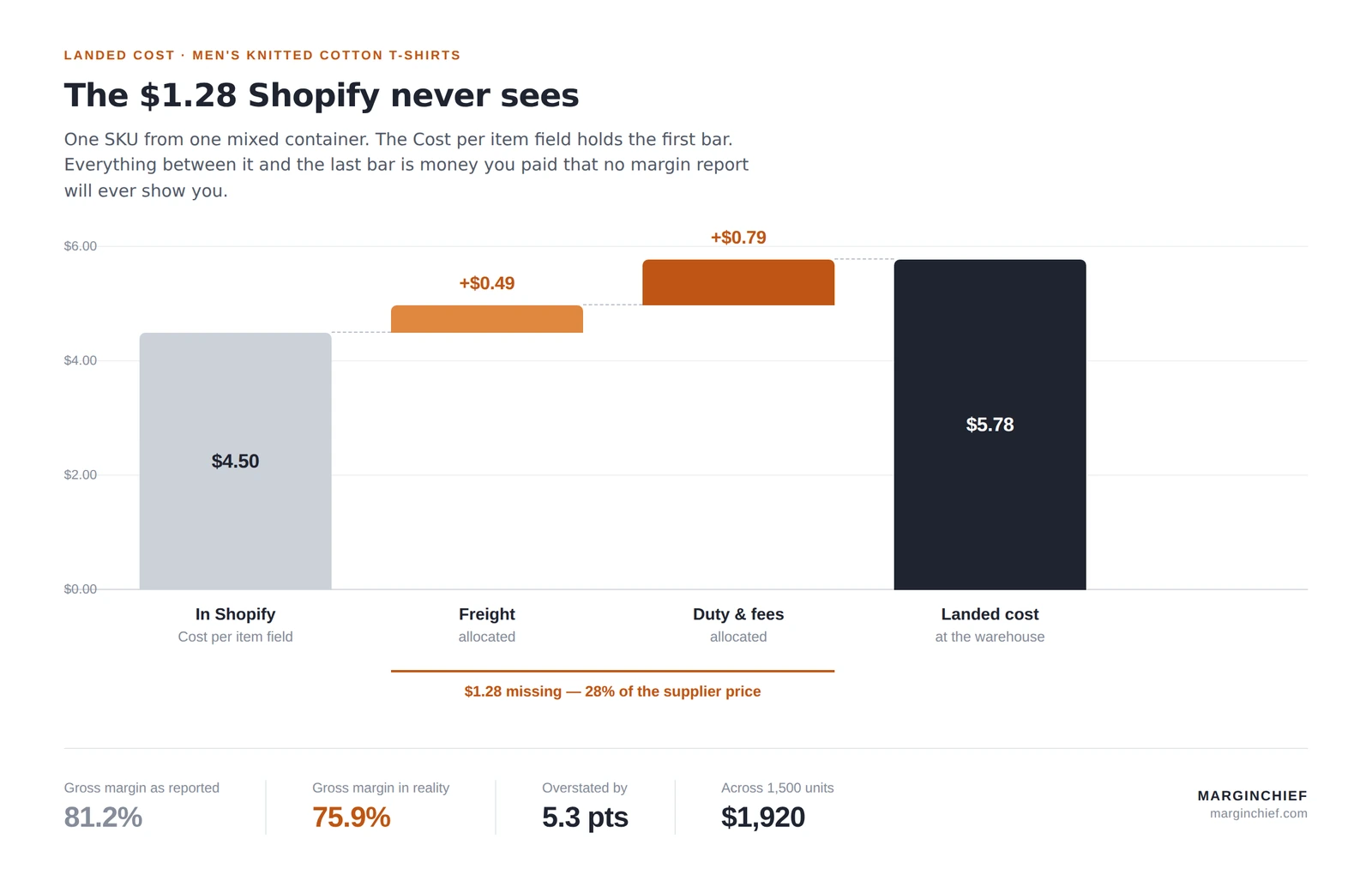
The number most merchants type into Shopify is $4.50. The number that should be in there is $5.78.
The real cost is 28% higher than the number in the field, and duty is doing most of the damage, not freight. Cotton knit T-shirts carry a US MFN rate of 16.5% before anything else is added, which is why apparel importers feel this worse than most categories.
What the gap does to your numbers
Put that shirt on the shelf at $24.00:
| Reported by Shopify | Actual | |
|---|---|---|
| Unit cost | $4.50 | $5.78 |
| Gross margin | 81.2% | 75.9% |
Overstated by 5.3 margin points. Across 1,500 units, that’s $1,920 of gross profit that does not exist.
Five points sounds survivable until you use the number to price or promote something. Run a 20% promotion on that shirt and Shopify tells you you’re still clearing 76.6%. You’re actually at 69.9%. The promotion is still profitable, but you approved it against a figure that was off by nearly seven points, and you’ll do the same next quarter on a SKU with thinner margins where it matters more.
The compounding problem is that this error is not uniform across your catalogue. Dense, cheap, high-duty products absorb far more landed cost as a percentage than light, expensive, low-duty ones. So the gap doesn’t just make everything look better by a constant amount; it reorders which products look best. You end up backing the wrong ones.
Get the right number into the box
MarginChief allocates freight, duty and fees across the SKUs in a shipment and writes the landed cost back to Shopify, with the working kept so you can show where it came from.
The field is fine. It does exactly what it says it does. The difficulty is that it accepts any number you give it, stamps that number permanently onto every order that follows, and never once suggests it might have been the wrong one. A supplier invoice price and a landed cost look identical sitting in that box: same currency, same two decimal places, same margin percentage rendered helpfully beside them. Only one of them is what the unit actually cost you.
Common questions
Does changing Cost per item update my past profit reports?
No. Shopify records the cost at the time of the order and that value is static. Changing the field affects orders placed after the change and leaves your history untouched.
Can I edit the cost recorded on a historical Shopify order?
Not natively. Shopify captures cost at order time and does not provide a way to amend it afterwards. Third-party tools exist, but there is no built-in correction.
Why don't some of my orders show up in profit reports?
Because they were sold with no cost recorded. Shopify reports profit only for products and variants that had a cost at the time of sale. Filling the field in later does not bring those orders into the report.
Should Cost per item include shipping?
Inbound shipping, yes. The freight that brought the goods to your warehouse capitalises into the cost of the product. Outbound shipping to the customer does not.
Does Shopify calculate weighted average cost?
No. There is one cost field per variant, holding one value at a time. There are no cost layers and no averaging across shipments.
This article is general information, not accounting or tax advice. Confirm your treatment with your own accountant.